Showing posts with label a second set. Show all posts

Tuesday, 4 April 2017

Best and latest laptop in the range of below 40K - Lenovo B-50-80


Lenovo B50-80 (80E502UQIN):- Lenovo B50-80 is one of the best laptop in the range of 40 thousand Rupees. It is called an office laptop due to strong hardware support that enable you to work for long time with strong battery back.


Lenovo B50-80 comes with 15.6 inches high definition (HD) anti glare screen which provide more clear picture and protect eyes from any light strain. Resolution of this laptop is 1366 x 768 pixels that gives more clear picture. Lenovo B-50-80 runs on DOS operating system; it means you can choose your operating and change whenever want. All window is compatible. You can user either Window XP, Window 7, Window 8, Window 8.1 or Window 10.   


Now, let us talk about most important part of laptop, it is CPU or central processing unit or in short we call it processor. A processor is responsible for quick response; in simple word, you can work fast if processor of your laptop is high performer.
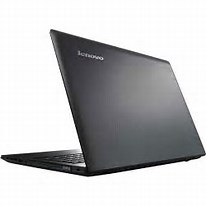


Lenovo B-50-80 is powered by 2.1 GHz Intel Core i3-5010U, fifth generation processor. It is also powered by Intel HD 5500 graphics card for high quality video performance. As far as RAM is concerned it has 4 GB RAM and 1 TB storage.


Presence of Dolby Digital in Lenovo B50-80 provides nice sound quality. If we talk about camera, it has 720 pixel high definition camera which makes you able to make your own video and upload on YouTube or similar site or social media.


Another feature which other laptop lacks in this range is finger sensor, it secure your privacy.  Dolby digital audio and anti glare screen makes it unique laptop in this range. USB port is one of the important factor in laptop. Lenovo B50-80 has two 3.0 USB port and on 2.0 USB port. USB port 3.0 can transfer file 10 times faster than USB 2.0. Cost of this laptop is only ₹ 35,500


DISPLAY– 15.6 inches HD anti-glare screen


RESOLUTION:- 1366 x 768 pixels


PROCESSOR (CPU) – 2.1 GHz Intel core i3-5010U (fifth generation) 


RAM – 4 GB, 


STORAGE – 1 TB, 


AUDIO - Dolby Digital  


CAMERA - HD camera (720 pixels), 


SENSOR: - Finger sensor, 


OPERATING SYSTEM - DOS (You can use any Window XP, 7, 8, 8.1, or 10)  


USB PORT - 3.0 USB Port -2 & 2.0 USB Port - 1 


GRAPHICS CARD - Intel HD 5500 graphics


DVD writer:- Present


Best laptop in the range of 40K - Acer Aspire E5


Acer Aspire E5-573G-38OS : Acer Aspire is one of the best laptop in the range of 40 thousand Rupees. This laptop has strong hardware that makes it ready for all type of task. You can use it for any purpose. Let us take a visit of  hardware and software of this laptop.   


Acer Aspire comes with 15.6 inches high definition (HD ) display with 1366 x 768 pixels resolution. 
It is powered by 2 GHz Intel Core i3-500U; fifth generation process for speed up work. And get the powered by  Nvidia GeForce 920M(2GB) dedicated graphics card for great 3 dimensional video reception. In short, nice gaming support. As far as RAM is concerned it has 4 GB RAM, 1TB storage and DV writer. Acer Aspire E5 runs on Window 10 operating system. Cost of this Laptop is ₹ 40.000


DISPLAY – 15.8 inches HD Display 


RESOLUTION:- 1366 x 768 pixels 


PROCESSOR– 2 GHz Intel Core i3-5005U (fifth – generation) 


GRAPHICS CARD – Nvidia GeForce 920M (2GB) dedicated graphics 


RAM – 4 GB, RA DDR3L SDRAM, 


STORAGE OR HARD DISK:- 1 TB HDD, 


OPERATING SYSTEM –Window 10, 


DVD-WRITER: - PRESENT


Tuesday, 7 March 2017

Twitter Hashtag Tutorial: How to Find the Right Hashtags to Use on Twitter

Friday, 3 March 2017

Latest Gadgets-tech.com : MOTO E3 Power VS Redmi 3S Prime Detailed Compariso...

http://appsolmusica.blogspot.in/2017/03/tech-talks-128-jio-prime-buy-one-get.html


https://youtu.be/cekGBmBcM5M

Friday, 25 November 2016

MOTO E3 Power VS Redmi 3S Prime Detailed Comparison

Saturday, 19 November 2016

How to secure your private message? Use Most useful Self-destructive message Apps & Keep your privacy secure!


SELF DESTRUCTIVE TEXT MESSAGE APPS FOR ANDROID IN 2016 


Many people asked me on (Quora.com) that what is self-destructive message and how it works?  Is there any apps which allows self-destruction after reading? Today, I’ll tell you about this application. The Self destructive message is a new android application which allows users to send messages without any fear about message history or tracking systems.


These application are capable of sending self-destructive text message that destroy itself after a certain period of time without leaving any trace or history behind.  It means, you can send messages fearlessly and keep your privacy secure.


Sometimes it happens in your life when someone borrow your Smartphone to send some message or some calls, but in hurry, you cannot delete your personal message, then what will happen? Answer is, yes, there is danger of reading private message by other. But this message application keeps you carefree from such danger and destruct itself after reading it after a certain time period. You can customized time limit. This application is also very useful in the case of losing mobile phone.


Here, I am giving details information about these android application which is best in my knowledge. You will be stun to see its features. These android application is very popularthese days because it secure your privacy. Here is list of these application with detail features. You can download them from Google Play


1.Telegram:-   

Telegram is a quick messaging application which keeps eyes on speed and security. It is very-fast, quite simple, secure and free of cost as well as  best alternative of most popular apps for WhatsApp. You can send all kind of messages; like, text message, photos, videos and files of any type .doc, .zip, .pdf, etc without any limit. You can also program your private Chat messages self-destruct automatically from both participating devices. That means you can send all types of disappearing content.


Download QR-Code 


2.Snapchat      

Snap chat is also one of the best self-destructive messaging application for android. It allows you to share photos and videos with your mates with option of self-destruction after they open your message. You can snap a photo or a video, add a caption, and send it to one or all your friends. No need to say, it is getting very popular among people owning to this stunning features of self-destruction without any cost.


Download QR-Code

.


3.SpeakOn


SpeakOn is such an application which allows you to use a secret code to protect your conversations and make sure nobody has access to those “special” chats even if you forget your phone somewhere. Here also, you can set a specific time period to self-destruction of message automatically in seconds or minutes after it has been read. It is also free of cost.

Download QR-Code 


4.Wickr 

Wickr is one of the message self-destructive android application. It allows you to secure your personal messages from unwanted person as well as free to other Wickr users across the world. This application allows you to send and receive text, photos, videos and voice messages using your Android phone. Bright aspect of this application is that  there is no server between the sender and receiver.


Download QR-Code


5.Bleep


Bleep is also a self-destructive message application for android. It is a fun and easy instant messaging application that keeps your message completely private. Bleep allows you to send text message, make free voice calls, or whisper. If you are sending a whisper to a friend, it means, your messages will disappear as they are read. There is no need to own a Bleep account to use it. Simply download the application, invite your friends and start chatting.


DownloadQR-Code


6.Private Text & Call 


Private text & call is one of the self-destructive android message application. This application allows you to make free secure phone calls, safely share photos and videos, hide text messages and calls from others. It also allows you to full messaging control; it means you can recall or remotely wipe your private messages. It also had a feature of private vault for extra piracy to secure confidential documents, photos and videos which are private.


Download QR-Code


Your comment and feedback is warmly welcome. If you find this information useful then share it to social network and friends as well as keep your view in comment section. You can also keep you opinion and tell what you want to see on this site.  


Monday, 14 November 2016

What's Special in Lenovo Vibe K5 Note?


Lenovo Vibe K5 Note is a one of the nice smartphone launched in 2016. This android phone is beautifully designed and comes with variant color; now, if talks about display it comes with a 5.5 inches touchscreen display with a high resolution of 1080 x 1920 pixels at a PPI of 401 pixels inch.


The Lenovo Vibe K5 Note is powered by 1.8 GHz Octa-Core MediaTek Helio P10 processor with support of 3 GB RAM. If we talk about storage, it has 32 GB internal storage that can be expand up to 128 GB via micro SD card. The handset runs over Android 6.0/Marshmallow operating system which make user to operate comfortably. Whereas camera is concerned it has 13 MP rear end camera and 8 MP front face camera. That means, you can shoot inside/outside if met with some awesome situation or scene with 13 MP rear end camera and take nice selfie with 8 MP front face camera. 


As we know that any device is not competed whether it is embedded with great updated features if there is not good battery backup; in this regard, Lenovo Vibe K5 Note is quite lucky because manufacturer has given awesome battery backup powered by 3500 mAh battery (non-removable battery). It’s dimension is 152.00 x 75.70 x 8.40 and weighs 165 grams.


Vibe K5 Note is a dual SIM (GSM & GSM) android phone that accept Nano-SIM in both slot. As far as connectivity is concerned Vibe K5 Note owns Wi-Fi, GPS, Bluetooth, NFC, USB OTG, FM, 3G and 4G (with support for Band 40 used by some LTE, networks in India). Sensors on the phone include Compass Magnetometer, Proximity sensor, Accelerometer, Ambient light sensor and Gyroscope.


Features at  Glance:-

Model:-Lenovo Vibe K5 Note


Processor:- 1.8 GHz MIKMT6755 Octa Core


Camera:- 13 MP & 8 MP camera 3, 1080p full HD recording,


Memory:-3 GB RAM,


Storage:- 32 GB, micro SD up to 128 GB,


Display - 5.5 inches 1080p full HD . 401 ppi,


Battery:- 3500 mAh,


Connectivity:- dual sim, 3G/4G LTE support, Fingerprint sensor,


Operating System;- Android v6(Marshmallow)


Wednesday, 1 June 2016

How to lock MiUi Apps to avoid people to peep into private Conversation/chat?


What is MiUi:- MiUi stands for Mi user interface and pronounced as “Me You I”; it is a play on the common abbreviation of the words user interface as UI. It is developed by Xiaomi Tech, & it is a stock and aftermarket firmware for Smartphones and tablet computers based on the Google Android operating system. 


This App is written in C, C++, and Java language. It is an open source with closed source components, initially released 5 years ago. Some interesting facts regarding MiUi is following:-


Marketing target: Firmware replacement for Android mobiledevice; stock firmware for mobile devices


Available in 32 languages; vary by country


Package manager: Google Play (excludes Mainland China)/Market/ Mi Appstore (mainland China)/ APK


Platforms:- 32-bit ARM, MIPS, x86, x64


Kernel type:- Monolithic, modified Linux kernel


Default user Interface: GUI (Multi-touch)


Official website:- www.en.miui.com  


Latest release :- Stable 7.3 (China) & 7.3 (Global)


How to lock MiUi:- MiUi has awesome feature of LOCKING up your Apps to avoid people to peep into our WhatApp, messenger, gallery etc. Though it is very common facility in any smartphone but in Mi, you needn’t to download any 3rd party App Locker from play store to get your apps locked. MiUi has inbuilt facility to lock your apps by using Lock Apps. If you want to Lock Apps In MIUI 6, then follow the following steps:-


STEP1:- Go to the phone SETTING and tap on the SECUTIRY to follow the next step.


SETP2:- Now from the security screen tap on the “PRIVACY PROTECTION” to lock your apps.


STEP3:- Once you in the privacy protection page, click on the “PRERMISSION”toggle and it will prompt you to set the “pattern lock” to lock the apps. Enter the pattern lock here to lock the apps.


STEP4:- After the lock pattern, go back to the Privacy Protection page and tap on the “LOCK APPS” option and select the apps which you want to lock.


STEP5:- Now the App is lock protected and no one can open the application without unlocking the pattern. Next time when you try to open the App you have to draw pattern to unlock the app. Without the password lock no one can open the app and setting of your phone.